Want to understand how it operates?
Clockato is an all-in-one solution handling complex shift tracking, real-time presence monitoring, and rigorous scheduling tasks. This page provides an in-depth breakdown of individual components, how different permission roles function, and specific use-cases for your team below.
Features you'll need
Eliminates time theft and manual errors with rigorous shift tracking.
Instantly see who is currently working, on a break, or off-shift.
Effortlessly tracks regular hours, breaks, and overtime without manual math.
Generates precise working hours reports, saving hours of HR administrative work.
Tailored access for super-admins, managers, and regular staff.
Intuitive dashboard requires zero training for your team.
Reduces administrative overhead and prevents overpaying for untracked breaks.
Transparent pricing with a cancel-anytime policy.
We are continually adding new features based on user feedback.
How do we ensure accuracy?
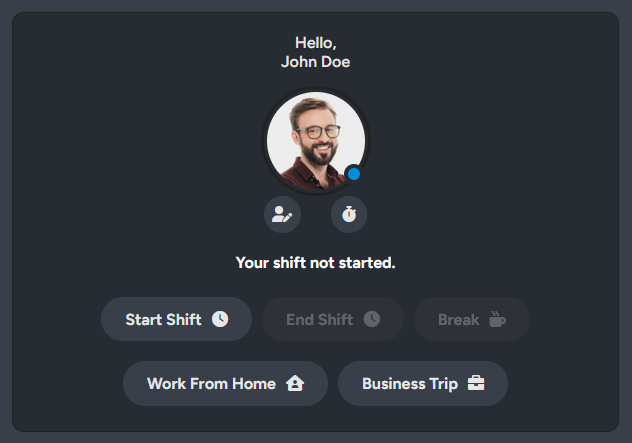
The foundation of Clockato revolves around precise, immutable logging of working hours. Users interact with a clean, unified modal to execute Clock In and Clock Out actions. To guarantee maximum data integrity, the system verifies chronological entries and actively prevents double logging or accidental skips.
We specifically integrated an advanced server-side backend logic using UTC normalization to handle the most complex shift scenarios: Overnight Shifts. Whether an employee starts at 10 PM and crosses the midnight threshold into the next calendar day, the total duration and timestamps are calculated flawlessly without breaking the monthly statistic metrics.
Where is everyone right now?
Administrators need to know who is actively working without constantly messaging their teams. We developed a fully robust, asynchronous (AJAX) live tracking architecture that functions like a presence map for your entire workforce.
When an employee activates their "Break" sequence or returns to "Online," their status updates immediately on the main dashboard for every manager observing the grid. This allows filtering live active members and inspecting scheduled categories instantly without any page reloads.

Need to plan shifts ahead?

Moving from retrospective tracking to future organization, the Shift Planner acts as the central hub for administrative assignments. Operating on an intuitive visual calendar interface, an Admin can click on any specific future date, assign one or multiple staff members, dictate their core project tags or categories, and publish a detailed schedule.
A standard user logging into their portal is immediately presented with their upcoming shifts, removing all confusion regarding shift allocations. Admins can effortlessly edit, delete, or modify existing shift blocks via customized context popups.
Who controls the system?
Admin: Enclosed safely within their specific company structure, an Admin handles day-to-day operations. They are responsible for inviting users, publishing shift plans, verifying tracked hours, correcting any manual timesheet errors, and publishing internal blog announcements.
Manager: Operating as a crucial mid-tier leader, the Manager oversees day-to-day team coordination. While they cannot alter company-wide settings, they are fully equipped to assign shift plans, approve standard timesheets, and closely monitor live team statuses to ensure shift compliance.
User: Restricted to execution interfaces to minimize confusion. Users only view their dedicated shift schedules, initialize personal Clock In/Out processes, change their momentary live status, and review their own past history for auditing.
Still have something on your mind?
You want to see it in action first?
To book a personalized live demo and request access to Clockato, simply complete the short form to the rightbelow and enter a convenient date and time in the message field that best suits you, according to your timezone. A member of our team will contact you to arrange a brief presentation, answer your questions, and discuss setting up your company workspace.